Quick entry: spend less time recording

YAFFA learns your habits so that recording each transaction takes seconds, not minutes

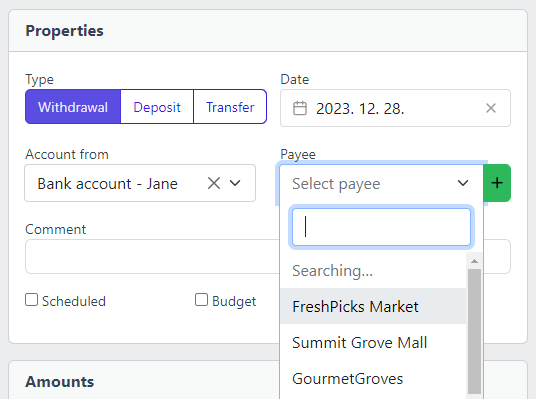
Screenshot of YAFFA personal finance application showing payee suggestions while entering a new transaction
Smart Payee Suggestions

The right payee appears before you finish typing

When you start a new transaction, YAFFA surfaces the payees you use most often. Your regular supermarket, your landlord, your employer — the accounts and counterparties you reach for every day are the ones that appear first. Less typing, fewer mistakes, and no hunting through a long list.

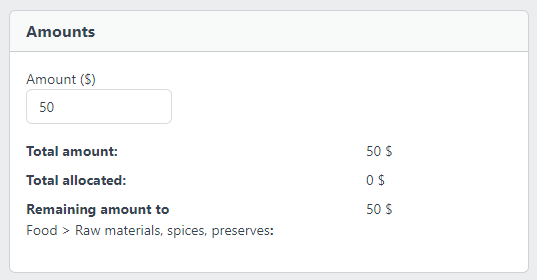
Screenshot of YAFFA personal finance application showing the default category being automatically allocated when a payee is selected
Default Category Pre-fill

Category filled in the moment you select a payee

Assign a default category to a payee once, and YAFFA pre-fills it every time that payee is selected during transaction entry. No dropdown searching, no repeating yourself. The more payees you configure, the faster each new transaction becomes — until categorization is effectively automatic for your regular spending.

Learn about payees

One-click entry of scheduled transactions

For transactions that recur on a known schedule — rent, salary, loan instalments, regular investments — YAFFA already knows what is coming. Your scheduled transactions appear on the dashboard calendar so you can see what is due and enter it with a single action. All the details are pre-filled from the schedule template: account, payee, category, amount. You confirm, and the transaction is recorded.

For recurring events where you want even less involvement, YAFFA supports automatic recording — the transaction is created when it falls due without requiring any manual confirmation at all.

Category suggestions that grow with your history

You do not need to configure default categories manually for every payee from the start. As you record transactions, YAFFA tracks which category you use most often with each payee. Once a clear pattern emerges — typically after five or more transactions — it surfaces a suggestion directly in the payee list. Accept it with one click, and every future transaction with that payee is pre-categorized automatically.

You stay in control: accept the suggestion, defer it, or dismiss it if the pattern does not reflect your intent. The result is a payee list that gradually becomes smarter the more you use YAFFA, without requiring any upfront configuration effort.

AI-assisted document processing

For users who want to go further, YAFFA also supports AI-powered document processing as an optional input method. You can submit a receipt, invoice, or email and let YAFFA extract the transaction details — payee, amount, date, and line items — and pre-fill a draft transaction for you to review and confirm. This works alongside all the other entry aids: AI extraction still benefits from your configured payees and categories when it maps the document data to your financial structure.

AI document processing is entirely optional and requires a separate setup with an external AI provider. All other quick-entry features described on this page work without it.

Explore YAFFA

More features and further details

Check out other features of YAFFA personal finance application, or learn more by reading the detailed documentation.

Features

Learn more about the features of YAFFA personal finance application

Learn More

Documentation

Read detailed guides how to get started with YAFFA personal finance application.

Learn More

Payees

Set up your payee list with default categories to make every quick-entry feature more effective

Learn More

Ready to take control of your finances?

Try the YAFFA sandbox free — no credit card, no bank connection, no data sharing.

Try the Demo — No Install Needed